Following requests from TaskBrowse’s forward-thinking users and in line with the global trend toward digital transformation, we have introduced a suite of AI-powered capabilities to make project management, task management, and meeting coordination faster, smarter, and more efficient.
In the following sections, you can explore these new features and learn how they can help your team work more effectively.
Before continuing, you can watch the video below for an overview of the new AI features available in TaskBrowse:
AI-Powered Analytical Reports
Detailed Timesheet Report
The Detailed Timesheet Report provides a comprehensive view of all tasks recorded by each user. This report allows you to review the following information in detail:
- Project name
- Completed task
- Actual time spent and planned time
- User-entered descriptions and notes
- Time range of each task
In summary, this report presents all information recorded in users’ daily timesheets in a clear and analyzable format.
To access this report, navigate to:
Reports → All Reports → Time Reports → Detailed Timesheet Report
If you have permission to view all reports, you can access detailed timesheets for all users. You can also filter the report by a specific user to review that person’s recorded activities.
Intelligent Analysis with TaskBrowse AI
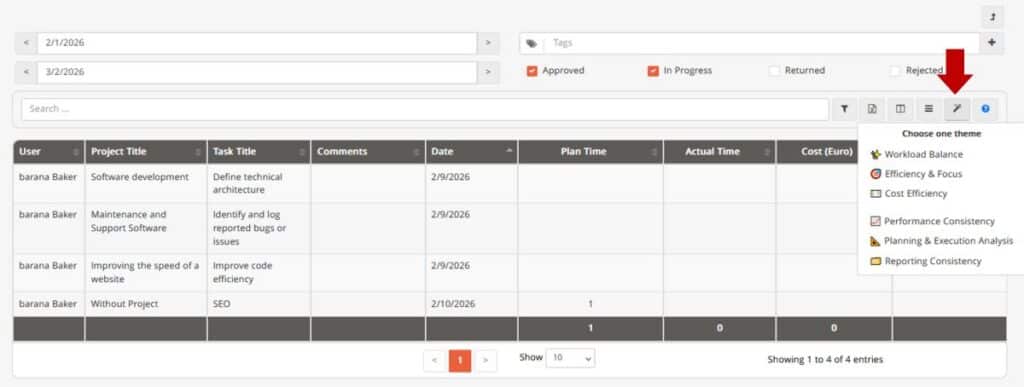
Within this report, TaskBrowse AI can generate managerial and operational insights based on the timesheet data.
To view these analyses, simply click the AI Summary icon and select the type of analysis you would like to perform. The AI will review the recorded data and provide actionable insights, helping managers and team leaders better understand work patterns, productivity, and potential areas for improvement.
AI-Powered Tag Suggestions for Tasks
To make task categorization faster and more accurate, a new AI-powered feature has been introduced that automatically suggests relevant tags for your tasks.
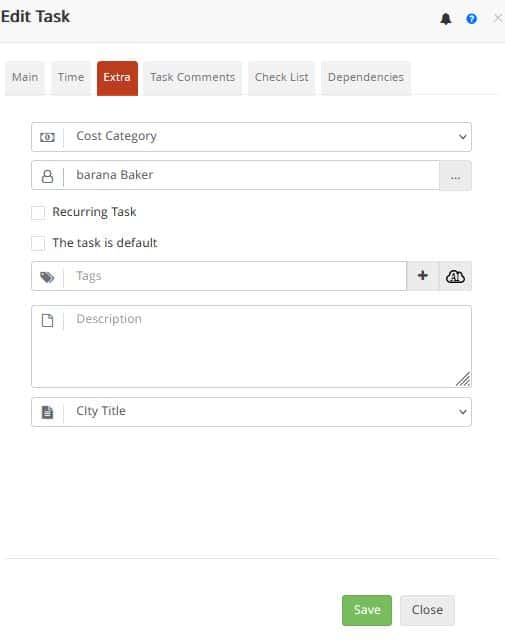
When creating or editing a task, navigate to the Extra tab and click the AI icon next to the Tags section. TaskBrowse AI will analyze the task and:
- Suggest relevant existing tags
- Generate new tags when appropriate
This feature helps you:
- Categorize tasks in seconds
- Generate more accurate tag-based reports and dashboards
- Maintain better consistency and organization across tasks
You can manage, edit, or delete tags at any time by navigating to:
System Setup → Tags
AI-Powered Task Workload Estimation
As you know, accurately estimating task Workload is one of the most important challenges in project management. It plays a critical role in planning, scheduling, resource allocation, and cost estimation.
In TaskBrowse, when defining a task under the Time tab, you can enter an estimated Workload (in hours). This value is used throughout the system for important purposes, including:
- Calculating actual task and project progress
- Evaluating users’ available capacity when assigning tasks
- Estimating costs based on the time required to complete a task
However, for many of our customers, accurately estimating task Workload has always been a challenge. To address this, we have introduced a new feature:
AI-Powered Workload Estimation
How Does It Work?
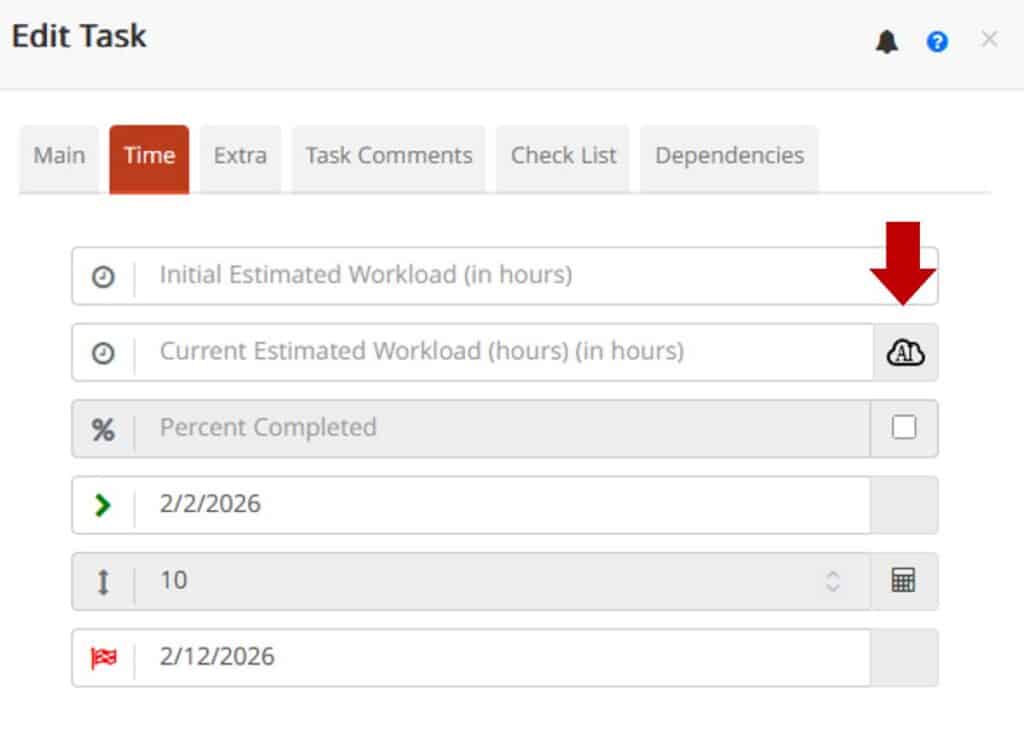
When creating a task, simply click the AI icon next to the Estimated Workload field.
TaskBrowse will analyze the history of similar tasks across your projects and intelligently predict the Workload required to complete the new task.
The system also displays a list of similar tasks, allowing you to review and select the most relevant examples.
For completed tasks, the AI uses the actual time spent as the basis for its estimation. For tasks that have not yet been completed, it uses their estimated Workload to improve the prediction model.
AI-Powered Meeting Management
The Meeting Management module provides a comprehensive set of features designed to improve the effectiveness and efficiency of team meetings, including:
- Agenda Creation – Create and share meeting agendas with participants to keep discussions organized and focused.
- Meeting Scheduling – Identify the best meeting time by considering participants’ schedules and availability.
- Attendance Tracking – Record and monitor participant attendance.
- Task Assignment – Create tasks directly from meeting decisions and track their completion.
- Collaboration Tools – Share documents and facilitate communication before, during, and after meetings.
- Follow-ups and Reminders – Automatically track action items and send reminders to ensure commitments are completed.
AI-Powered Meeting Management
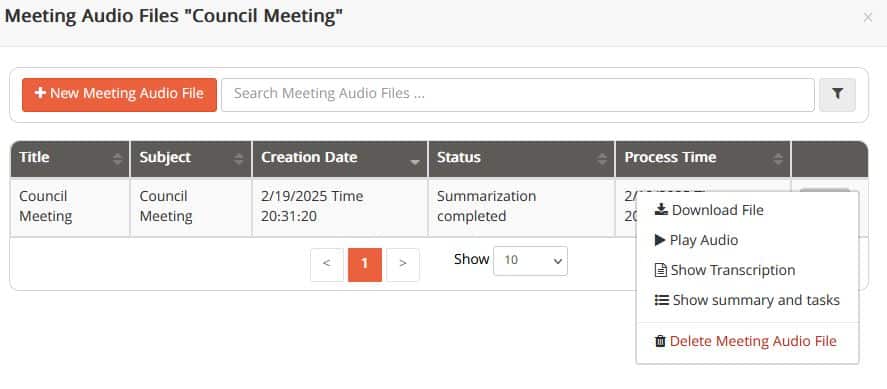
With TaskBrowse AI, you can record your team meetings and let artificial intelligence automatically transform discussions into structured tasks and actionable insights.
This eliminates the need for manual note-taking and helps ensure that important action items are not overlooked after the meeting.
TaskBrowse AI Features
· Easy Recording
Record meetings directly within the platform or upload existing audio files from your meetings.
· Accurate Transcription
Generate highly accurate meeting transcripts with speaker identification, making it easy to review who said what.
· Automatic Task Extraction
TaskBrowse AI analyzes meeting discussions and automatically identifies action items and tasks that require follow-up.
· Meeting Summaries
Receive concise and insightful summaries highlighting key discussion points, decisions, and outcomes from the meeting.
AI-Powered Conversation Summaries
In TaskBrowse, you can communicate with your team in real time through project- and task-specific chat groups, share files, mention team members, and collaborate more effectively.
With the addition of AI capabilities, you can now:
- Generate concise summaries of conversations
- Identify tasks and action items discussed in the chat
- Reduce the time spent reviewing long discussion threads
Simply click the AI icon within the online chat to instantly gain a clear overview of the conversation and a smarter, more efficient collaboration experience.